
Freecodcamp CSS Project “Build a Technical Documentation Page”
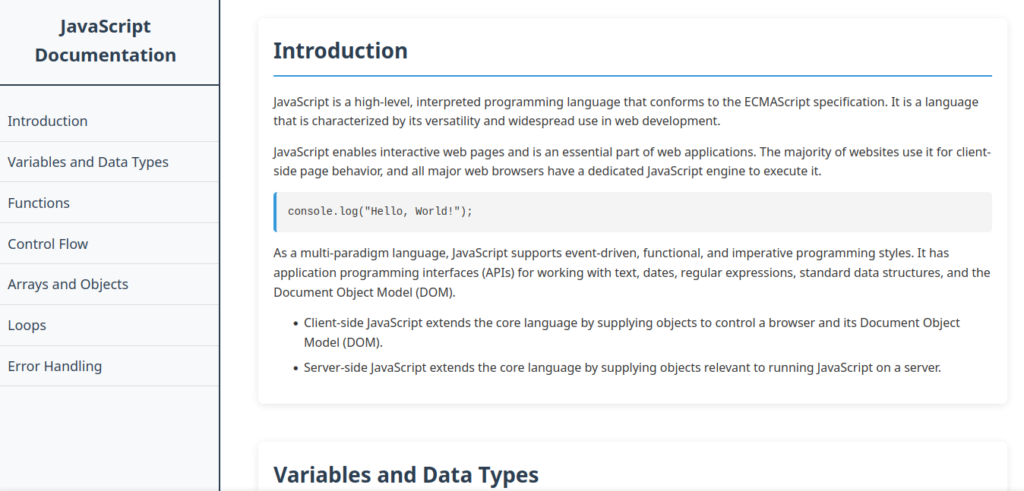
Live Preview: https://saideresearch.github.io/technical-documentation/
Code:
<!DOCTYPE html>
<html lang="en">
  <head>
    <meta charset="UTF-8" />
    <title>Technical Documentation Page</title>
    <style>
      * {
        margin: 0;
        padding: 0;
        box-sizing: border-box;
      }

      body {
        font-family: 'Segoe UI', Tahoma, Geneva, Verdana, sans-serif;
        line-height: 1.6;
        color: #333;
        display: flex;
        flex-direction: column;
      }

      /* Navbar styles */
      #navbar {
        position: fixed;
        top: 0;
        left: 0;
        width: 300px;
        height: 100vh;
        border-right: 2px solid #2c3e50;
        background-color: #f8f9fa;
        overflow-y: auto;
        padding: 20px 0;
      }

      #navbar header {
        font-size: 24px;
        font-weight: bold;
        padding: 0 20px 20px 20px;
        color: #2c3e50;
        border-bottom: 2px solid #2c3e50;
        margin-bottom: 20px;
        text-align: center;
      }

      .nav-link {
        display: block;
        padding: 12px 20px;
        color: #2c3e50;
        text-decoration: none;
        font-size: 18px;
        border-bottom: 1px solid #ddd;
        transition: all 0.3s ease;
      }

      .nav-link:hover {
        background-color: #2c3e50;
        color: white;
        padding-left: 30px;
      }

      /* Main content styles */
      #main-doc {
        margin-left: 320px;
        padding: 30px;
        max-width: 1200px;
      }

      .main-section {
        margin-bottom: 50px;
        padding: 20px;
        background-color: white;
        border-radius: 8px;
        box-shadow: 0 2px 10px rgba(0, 0, 0, 0.1);
      }

      .main-section header {
        font-size: 28px;
        font-weight: bold;
        color: #2c3e50;
        margin-bottom: 20px;
        padding-bottom: 10px;
        border-bottom: 2px solid #3498db;
      }

      .main-section p {
        margin-bottom: 15px;
        font-size: 16px;
      }

      .main-section code {
        display: block;
        background-color: #f4f4f4;
        padding: 15px;
        margin: 15px 0;
        border-radius: 5px;
        border-left: 4px solid #3498db;
        font-family: 'Courier New', monospace;
        font-size: 14px;
        white-space: pre-wrap;
      }

      .main-section ul, .main-section ol {
        margin: 15px 0 15px 40px;
      }

      .main-section li {
        margin-bottom: 8px;
      }

      /* Media query for smaller screens */
      @media (max-width: 768px) {
        body {
          flex-direction: column;
        }

        #navbar {
          position: relative;
          width: 100%;
          height: auto;
          border-right: none;
          border-bottom: 2px solid #2c3e50;
        }

        #main-doc {
          margin-left: 0;
          padding: 20px;
        }
      }
    </style>
  </head>

  <body>
    <nav id="navbar">
      <header>JavaScript Documentation</header>
      <a class="nav-link" href="#Introduction">Introduction</a>
      <a class="nav-link" href="#Variables_and_Data_Types">Variables and Data Types</a>
      <a class="nav-link" href="#Functions">Functions</a>
      <a class="nav-link" href="#Control_Flow">Control Flow</a>
      <a class="nav-link" href="#Arrays_and_Objects">Arrays and Objects</a>
      <a class="nav-link" href="#Loops">Loops</a>
      <a class="nav-link" href="#Error_Handling">Error Handling</a>
    </nav>

    <main id="main-doc">
      <section class="main-section" id="Introduction">
        <header>Introduction</header>
        <p>JavaScript is a high-level, interpreted programming language that conforms to the ECMAScript specification. It is a language that is characterized by its versatility and widespread use in web development.</p>
        <p>JavaScript enables interactive web pages and is an essential part of web applications. The majority of websites use it for client-side page behavior, and all major web browsers have a dedicated JavaScript engine to execute it.</p>
        <code>console.log("Hello, World!");</code>
        <p>As a multi-paradigm language, JavaScript supports event-driven, functional, and imperative programming styles. It has application programming interfaces (APIs) for working with text, dates, regular expressions, standard data structures, and the Document Object Model (DOM).</p>
        <ul>
          <li>Client-side JavaScript extends the core language by supplying objects to control a browser and its Document Object Model (DOM).</li>
          <li>Server-side JavaScript extends the core language by supplying objects relevant to running JavaScript on a server.</li>
        </ul>
      </section>

      <section class="main-section" id="Variables_and_Data_Types">
        <header>Variables and Data Types</header>
        <p>Variables are containers for storing data values. In JavaScript, you can declare variables using var, let, or const.</p>
        <code>let name = "John";<br>const age = 30;<br>var isStudent = true;</code>
        <p>JavaScript has dynamic types. This means that the same variable can be used to hold different data types.</p>
        <p>JavaScript data types include:</p>
        <ul>
          <li>Number: integers and floating-point numbers</li>
          <li>String: textual data</li>
          <li>Boolean: true or false</li>
          <li>Null: intentional absence of value</li>
          <li>Undefined: variable declared but not assigned</li>
          <li>Object: complex data structures</li>
          <li>Symbol: unique identifier</li>
        </ul>
      </section>

      <section class="main-section" id="Functions">
        <header>Functions</header>
        <p>Functions are one of the fundamental building blocks in JavaScript. A function is a set of statements that performs a task or calculates a value.</p>
        <code>function greet(name) {<br>  return "Hello, " + name + "!";<br>}<br><br>console.log(greet("World"));</code>
        <p>Functions can be defined in several ways:</p>
        <ul>
          <li>Function declarations: function name() {}</li>
          <li>Function expressions: const name = function() {};</li>
          <li>Arrow functions: const name = () => {};</li>
        </ul>
        <p>Functions can take parameters and return values. In JavaScript, functions are first-class objects, meaning they can be passed as arguments to other functions, returned from functions, and assigned to variables.</p>
        <code>const add = (a, b) => a + b;<br>console.log(add(5, 3)); // Output: 8</code>
      </section>

      <section class="main-section" id="Control_Flow">
        <header>Control Flow</header>
        <p>Control flow statements allow you to control the execution of your code based on certain conditions or repeatedly execute blocks of code.</p>
        <code>let score = 85;<br><br>if (score >= 90) {<br>  console.log("Grade A");<br>} else if (score >= 80) {<br>  console.log("Grade B");<br>} else {<br>  console.log("Grade C");<br>}</code>
        <p>Conditional statements include if, else if, else, and switch. These allow your program to make decisions.</p>
        <p>The switch statement is used to perform different actions based on different conditions.</p>
        <code>let day = "Monday";<br><br>switch(day) {<br>  case "Monday":<br>    console.log("Start of week");<br>    break;<br>  case "Friday":<br>    console.log("End of week");<br>    break;<br>  default:<br>    console.log("Mid week");<br>}</code>
      </section>

      <section class="main-section" id="Arrays_and_Objects">
        <header>Arrays and Objects</header>
        <p>Arrays are used to store multiple values in a single variable. They can hold any type of data.</p>
        <code>let fruits = ["apple", "banana", "orange"];<br>console.log(fruits[0]); // Output: "apple"<br><br>fruits.push("grape");<br>console.log(fruits.length); // Output: 4</code>
        <p>Objects are collections of key-value pairs. They can contain properties and methods.</p>
        <code>let person = {<br>  firstName: "John",<br>  lastName: "Doe",<br>  age: 30,<br>  fullName: function() {<br>    return this.firstName + " " + this.lastName;<br>  }<br>};<br><br>console.log(person.fullName());</code>
        <p>You can access object properties using dot notation or bracket notation.</p>
      </section>

      <section class="main-section" id="Loops">
        <header>Loops</header>
        <p>Loops are used to execute a block of code multiple times. JavaScript supports various types of loops.</p>
        <code>// For loop<br>for (let i = 0; i < 5; i++) {<br>  console.log(i);<br>}<br><br>// While loop<br>let j = 0;<br>while (j < 5) {<br>  console.log(j);<br>  j++;<br>}</code>
        <p>Other loop types include:</p>
        <ul>
          <li>do...while: executes at least once</li>
          <li>for...in: iterates over object properties</li>
          <li>for...of: iterates over iterable objects</li>
        </ul>
        <code>// For...of loop<br>let colors = ["red", "green", "blue"];<br>for (let color of colors) {<br>  console.log(color);<br>}</code>
      </section>

      <section class="main-section" id="Error_Handling">
        <header>Error Handling</header>
        <p>Error handling is crucial for creating robust applications. JavaScript provides try-catch-finally blocks to handle runtime errors gracefully.</p>
        <code>try {<br>  let result = riskyOperation();<br>  console.log(result);<br>} catch (error) {<br>  console.log("An error occurred:", error.message);<br>} finally {<br>  console.log("This always runs");<br>}</code>
        <p>You can also create custom errors using the throw statement.</p>
        <code>function validateAge(age) {<br>  if (age < 0 || age > 150) {<br>    throw new Error("Invalid age");<br>  }<br>  return true;<br>}</code>
        <p>Proper error handling helps prevent your application from crashing and provides better user experience by displaying meaningful error messages.</p>
      </section>
    </main>
  </body>
</html>